eclipse-timekeeper
Timekeeper for Eclipse 
Timekeeper tracks work sessions, projects, tasks and activities in Eclipse or through a standalone server with a bundled browser interface. Optional Eclipse Mylyn integration also tracks local and connector-backed tasks.
Documentation is grouped by responsibility:
- Architecture: component overview, data model and API v1.
- Operations: server, local Docker setup, Tailscale access, Eclipse connection, deployment, Synology package candidate and database recovery.
- Web account tools: accounts and recovery and Toggl Track import and Undo.
- Development: repository layout, web client, release process, change history and dated upgrade plan.
- Verification: acceptance evidence.
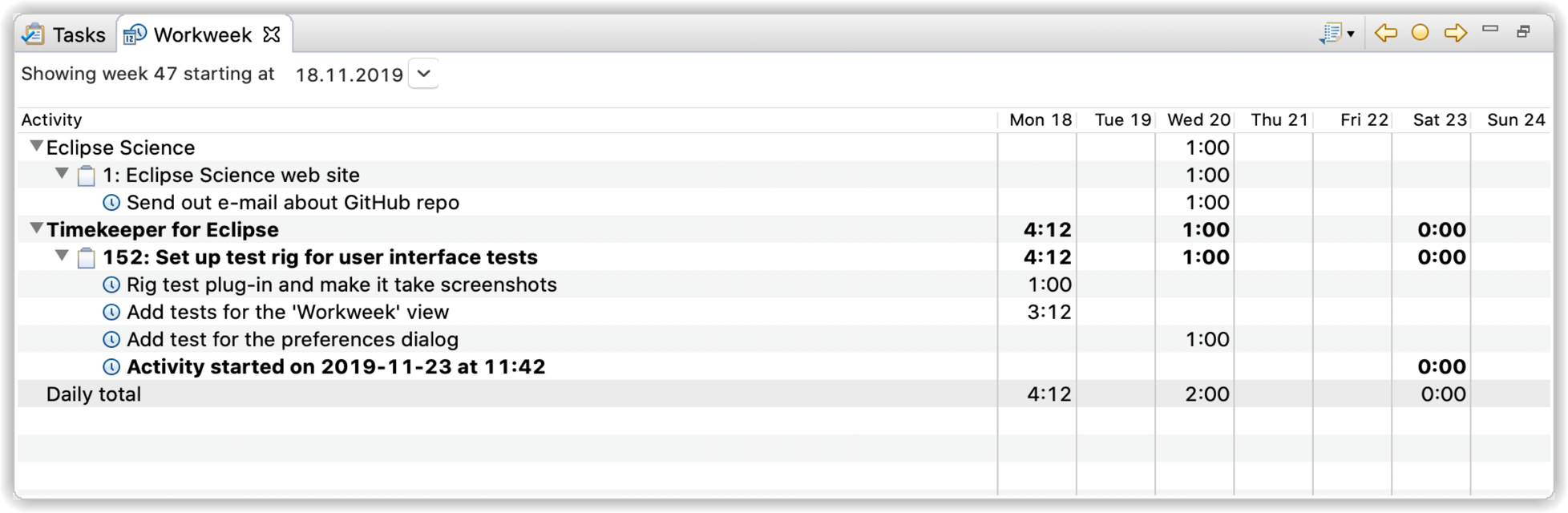
Open Workweek to create projects, tasks and subtasks, start or stop tracking, and record or edit activities on any date. Native records belong to Timekeeper and are available without Mylyn or a repository account. Optional Mylyn integration tracks task activation and synchronizes Task List projections.
The 2.0 user guide covers native editing, summaries and labels, weekly reports, Task List synchronization and idle-time correction. See the Wiki home for publication status and earlier-release documentation. The Wiki describes candidate features explicitly while 2.0 acceptance remains open.
Jira connector
Install Timekeeper Mylyn integration and the separate
JiraConnector plugin from
https://gnl42.github.io/JiraConnector-update/. Keep the Eclipse 2026-09
software site enabled and restart before adding a Jira repository.
JiraConnector 6.0.0.202605160149 is tested on Java 21, Eclipse 4.41 and Mylyn 4.12. Actual installation and Timekeeper metadata/tracking fixtures are verified, and the maintainer accepted and closed #230 with “Tested OK”. The exact manually tested Jira deployment/authentication combination is not recorded; this does not certify every Cloud/Data Center setup. The separate Mylyn tooltip parser issue (#243) was deferred beyond 2.0 by the maintainer. It remains an accepted exception, with no experimental Mylyn fix bundled; see the upgrade-plan decision. The connector guide explains project/category/custom-field grouping, the None fallback and issue-key display. See the Jira acceptance report for evidence and limits. Timekeeper delegates credentials to the connector and does not send activities to Jira worklogs.
Client/server work for 2.0
The complete client/server deployment is required before 2.0 publication:
versioned REST API/ownership, Quarkus server, remote Eclipse operation, web
frontend and client synchronization. See #187
and the HTTP API contract for the design and acceptance boundaries.
The server supports the remote Eclipse client and includes a browser client at
/web/. See the local Docker setup guide to run both
against the same server. Final release acceptance remains required before 2.0
publication.
The client/server acceptance report
maps #187’s requirements to inspected merged-main server, browser and installed
Eclipse evidence, including synchronization and interrupted-operation recovery.
Database configuration
Choose shared, workspace-relative or explicit H2 storage in Preferences >
Timekeeper > Database. The default is shared storage under .timekeeper in
your home directory; restart after changing the location. See the
installation and storage guide
for the user workflow. Database instances use H2 mixed mode; service writes
are serialized and stale record versions are rejected. See multi-instance acceptance.
The Eclipse 2026-09 upgrade uses H2 2.5.250 with schema version 3 as its supported database baseline. Start with new storage; historical H2 files, unversioned databases and old Mylyn attribute records are not imported. Schema versioning and guarded migration-target infrastructure are retained for future migrations. Known version-2 storage is extended for Work Sessions after a verified SQL backup; historical formats remain unsupported. See the complete data model and ER diagram and the database policy, backups and future migration contract.
Keep unsupported databases intact and select a separate empty location. CSV Export/Import now targets the current project, task, activity, external-reference and relation tables, including native task hierarchy, labels and work sessions, but it remains a convenience interchange format rather than a database backup, migration or rollback mechanism.
Installing
For unreleased 2.0 builds, use the testing update site
in Help > Install New Software… > Add…. It is populated from the
p2-repository artifact only after a complete successful main Build workflow,
including the platform matrix and installed client tests. The page records the
tested source, feature version and build identity. This is separate from release
candidates and stable releases.
Published releases are hosted on GitHub Pages. In Help > Install New Software… > Add…, use this stable update-site URL:
https://turesheim.github.io/eclipse-timekeeper/updates/
The site becomes installable when the first release using the new publication workflow is published. Prereleases use a separate opt-in channel:
https://turesheim.github.io/eclipse-timekeeper/updates/preview/
For a specific release, use updates/releases/<tag>/ under the same base URL,
for example https://turesheim.github.io/eclipse-timekeeper/updates/releases/v2.0.0/.
Each release also provides a timekeeper-p2.zip asset and SHA-256 checksum on
GitHub Releases.
The release also includes timekeeper-server.zip and its checksum for the
server and bundled web client.
Download the p2 ZIP and select Add… > Archive…, or extract it and select
Add… > Local…. These assets do not require a GitHub login to download.
Before publication, candidate builds remain available as the p2-repository
artifact from GitHub Actions.
Extract the artifact and select Add… > Local…. The older public release
is also listed on the Eclipse Marketplace.
See release publication for the workflow and retry procedure.
Timekeeper 2.0.0 requires Eclipse 2026-09 (4.41) and Java 21. Select Timekeeper for Eclipse for native project, task and activity management. Mylyn is optional. Select Timekeeper Mylyn integration as well to track Mylyn task activation and use Task List projections. The integration requires Mylyn Tasks 4.12; keep the Eclipse 2026-09 software site enabled so p2 can resolve its complete feature. Repository connectors such as Bugzilla are optional.
The base UI, domain, client API and database contain no Mylyn API dependencies. Idle-time corrections use the client API for native and linked tasks. Returning from an extended absence stops tracking when Automatically stop tracking when away is enabled; otherwise it starts a new interval after excluding idle time. Open activities are owned by Timekeeper and remain open across restart, even if a linked provider task is absent or inactive. Stop or edit those intervals in Workweek when needed.
Earlier release candidate builds were installed and updated in a clean Eclipse 4.41 runtime on macOS Apple Silicon. The optional-adapter split is additionally verified in separate Eclipse test runtimes with and without Mylyn. See the installed-IDE acceptance report for the verified behavior and the remaining upstream Mylyn Error Log blocker. This is not yet a release certification.
Supported environments
Timekeeper 2.0.0 targets Eclipse 2026-09 (4.41) on Java 21. The following environments have direct acceptance evidence:
- macOS on Apple Silicon: clean build, installation, update, restart, data, manual-editing and native idle-detection checks;
- Linux x86_64 with X11: the complete automated build and UI suite under Xvfb;
- Windows x86_64: clean build, persistence tests and a native idle-detection smoke test.
macOS x86_64 and Linux aarch64 are build targets but have not received installed
runtime acceptance. Native idle detection is unavailable in a pure Wayland
session; it requires X11 or a usable XWayland DISPLAY with XScreenSaver. See
the platform acceptance report for the full
support boundaries.
Upgrade and rollback
Version 2.0.0 does not migrate databases from earlier releases. Before changing an installation, stop every Eclipse instance and H2 server that uses Timekeeper, preserve the old database and workspace, and configure 2.0.0 with a separate, empty storage location. Do not point 2.0.0 at an old H2 file or unversioned database.
To roll back the application, stop Eclipse, uninstall 2.0.0, reinstall the prior Timekeeper release, and restore that release’s original workspace, database and database-location setting. Do not open a 2.0.0 schema with an older Timekeeper or H2 version. Current-schema backup and restore instructions are in the database policy.
Building
Use JDK 21 and complete the developer prerequisites. Clone the project and from the root execute:
./mvnw -B -ntp clean verify -Dtycho.localArtifacts=ignore
The Linux CI and release builds also enable -Pjira-connector-tests. This
installs the pinned JiraConnector 6 feature into a dedicated p2 test runtime,
uses a loopback REST fixture for Basic/Bearer authentication, queries, the issue
editor and activity tracking, then starts a second Eclipse process to verify
file-backed history and reconnection. Run it locally with:
./mvnw -B -ntp clean verify -Pjira-connector-tests -Dtycho.localArtifacts=ignore
On Linux, run under Xvfb as in CI. Jira is a test-only dependency and is not added to either Timekeeper release feature. The fixture requires no account or secrets. Passing these tests does not certify live Jira Cloud/Data Center configuration or resolve the deferred upstream Mylyn tooltip parser issue. See the automated Jira acceptance report.
On Windows, use mvnw.cmd. The Apache Maven wrapper downloads and uses Maven
3.9.16, the same version used by CI. Maven 3.10 rejects nested-JAR classifiers
generated by Tycho 5.0.4; direct mvn builds therefore require Maven 3.9.9–3.9.x.
When the build completes successfully there will be an Eclipse p2 repository at eclipse/net.resheim.eclipse.timekeeper-site/target/repository which you can install from.
For Eclipse PDE development, open eclipse/default.target and choose Set as Active
Target Platform. This is the authoritative target for both PDE and Maven,
using the dated Eclipse 2026-09 repository with pinned root dependencies.
Configure a JavaSE-21 execution environment in Eclipse. The development and
integration-test launch configurations use this environment and standard PDE
launchers; Java Mission Control is not required.
On Linux, run the UI tests under a graphical session or Xvfb, as in the GitHub Actions workflow. Upgrade progress, known failures and migration requirements are tracked in UPGRADE-PLAN.md and docs/verification/README.md.
This project is using JProfiler for debugging performance issues.
License
Copyright © 2014-2020 Torkild Ulvøy Resheim. All rights reserved. This program and the accompanying materials are made available under the terms of the Eclipse Public License v1.0 which accompanies this distribution, and is available at http://www.eclipse.org/legal/epl-v10.html